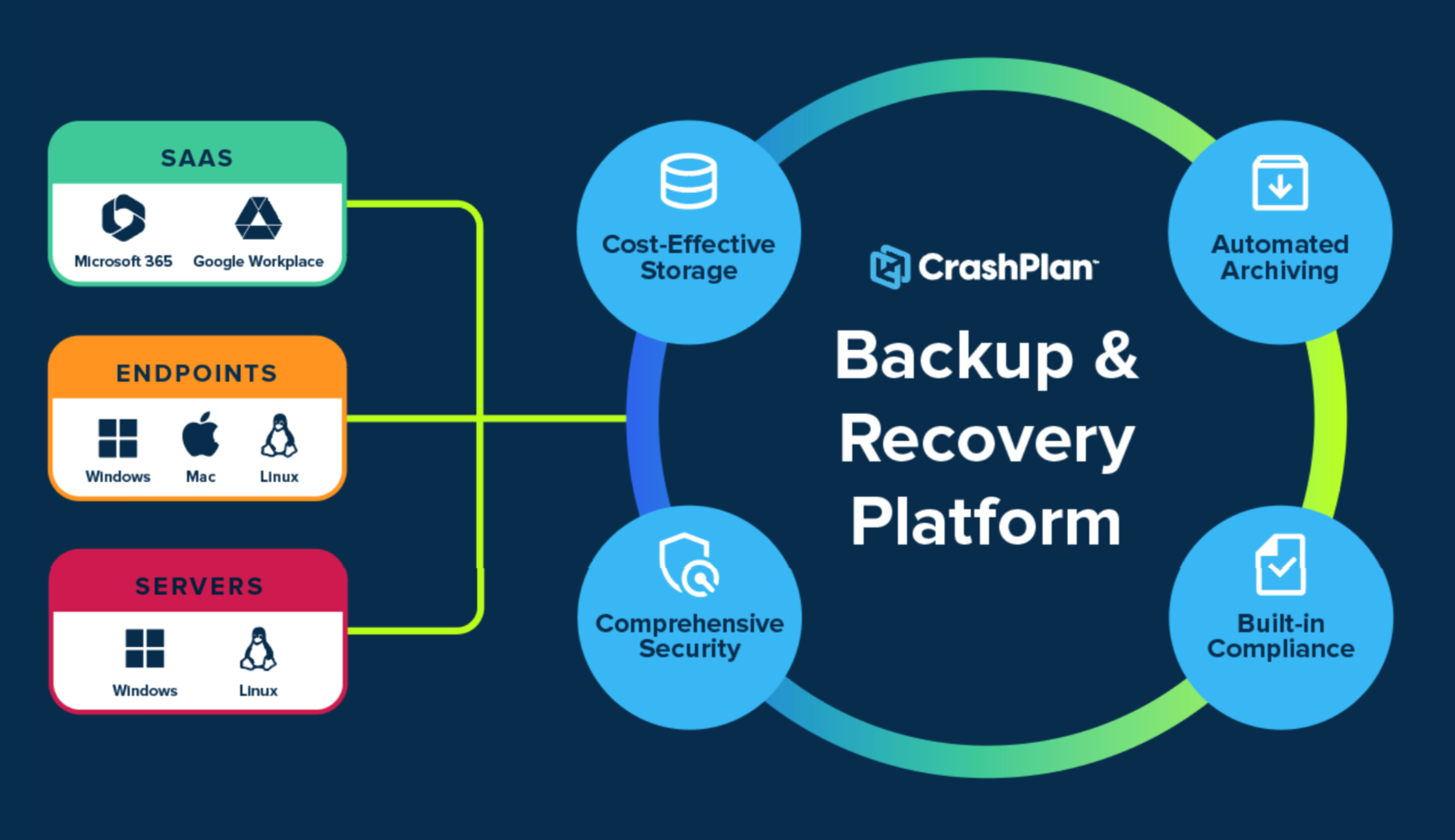
Server Backup and Recovery

Server Backup for 50–70% less

Only pay for the data you protect, not the number of servers.:

  • Unlimited retention and restores
  • Choose where your backup lives
  • No per-server pricing

20-server example

10 TB data protected, 90 day retention


CrashPlan
$4,500 – $5,500/year
Flat rate, storage included

Server Market-share
Leader
$9,729 – $14,259/year
Server licenses + backup storage
Estimated savings
55–63%

How CrashPlan Lowers Server Backup Costs

Simpler pricing. Fewer cost traps.

Cost factor


Pricing model

Server licenses

Backup storage

Storage measurement

Retention

Restores

Appliances

CrashPlan Backup and Recovery


  • Amount of source data protected
  • No per-server licensing
  • Included
  • Total source data only
  • Unlimited retention included
  • Unlimited
  • Not required

You pay for source data, not the backups that pile up behind it.

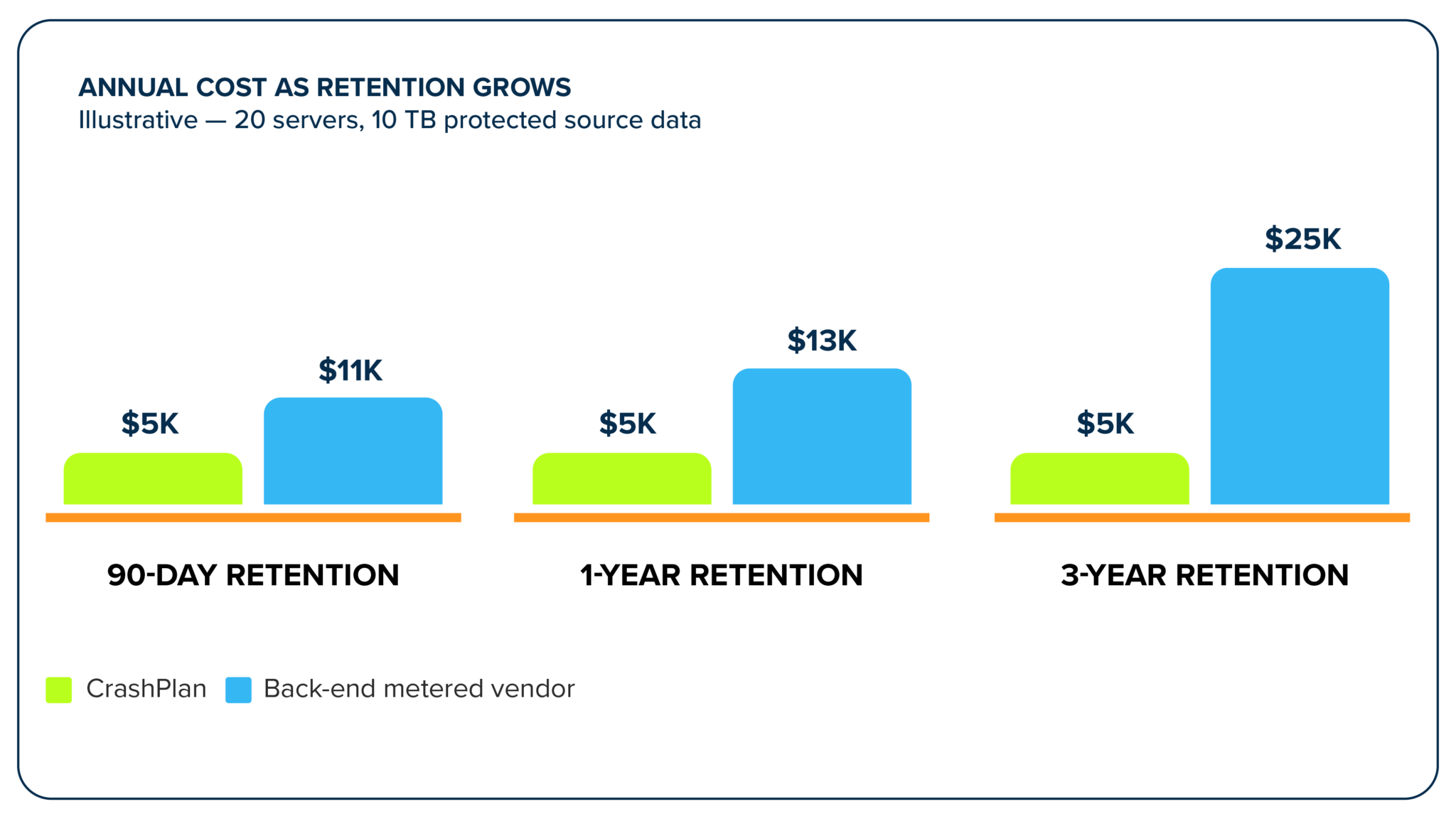
CrashPlan measures front-end protected data volume, the total source data you protect across servers. Many competitors charge based on back-end stored data volume, meaning as your retention data grows, your bill grows too.

Enterprise Protection

Enterprise protection. No tradeoffs.

A more cost-effective pricing model does not mean a compromise in capabilities. CrashPlan delivers the capabilities that protect your data and keep you recovery-ready.

Choose where your backups live

Storage is one of the biggest drivers of backup cost and complexity. Most vendors lock you into a single option. CrashPlan does the opposite. You choose what makes sense for your environment.

  • Flexible storage options
    Store backups in CrashPlan data centers or CrashPlan managed Azure. Or use your own cloud storage if that fits your broader strategy.
  • No lock-in
    You are not tied to one model or one pricing structure. You stay in control.
  • Outcome
    Lower costs over time, more flexibility, and no need to redesign your architecture just to make backup work.

Keep backup efficient as your data grows

Server data does not stay still. It keeps growing across file shares, applications, and teams. If backup is not efficient, that growth turns into higher storage use, longer backup windows, and more overhead.

CrashPlan is built to keep things predictable as you scale.

  • Data efficiency
    Deduplication, compression, and incremental backups reduce storage requirements and backup transfer volume without data loss.
  • Performance
    Multi-threaded backups help move large amounts of data faster and keep backup windows under control.
  • Scales with you
    Works across distributed environments without adding complexity.
  • Outcome
    Steady, predictable growth, better use of storage, and backup that keeps up with your environment.

Recover quickly when something goes wrong

When server data is lost, the priority is simple. Get it back fast and get people working again. CrashPlan focuses on making recovery straightforward and reliable.

  • Self-serve
    You can choose to enable self-server recovery, or keep it entirely in IT’s hands.
  • Full recovery
    Restore files, system state, and configurations so servers come back the way they were.
  • Granular recovery
    Pull back a single file or folder without having to rebuild everything.
  • Ransomware recovery
    Restore clean data from backups that are kept separate from production systems, supporting recovery from ransomware and other data loss events.
  • Centralized recovery
    Manage all restores in one place across endpoints, Microsoft 365, and servers.
  • Outcome
    Less downtime, faster recovery, and fewer disruptions for your teams.

Storage is one of the biggest drivers of backup cost and complexity. Most vendors lock you into a single option. CrashPlan does the opposite. You choose what makes sense for your environment.

  • Flexible storage options
    Store backups in CrashPlan data centers or CrashPlan managed Azure. Or use your own cloud storage if that fits your broader strategy.
  • No lock-in
    You are not tied to one model or one pricing structure. You stay in control.
  • Outcome
    Lower costs over time, more flexibility, and no need to redesign your architecture just to make backup work.

Server data does not stay still. It keeps growing across file shares, applications, and teams. If backup is not efficient, that growth turns into higher storage use, longer backup windows, and more overhead.

CrashPlan is built to keep things predictable as you scale.

  • Data efficiency
    Deduplication, compression, and incremental backups reduce storage requirements and backup transfer volume without data loss.
  • Performance
    Multi-threaded backups help move large amounts of data faster and keep backup windows under control.
  • Scales with you
    Works across distributed environments without adding complexity.
  • Outcome
    Steady, predictable growth, better use of storage, and backup that keeps up with your environment.

When server data is lost, the priority is simple. Get it back fast and get people working again. CrashPlan focuses on making recovery straightforward and reliable.

  • Self-serve
    You can choose to enable self-server recovery, or keep it entirely in IT’s hands.
  • Full recovery
    Restore files, system state, and configurations so servers come back the way they were.
  • Granular recovery
    Pull back a single file or folder without having to rebuild everything.
  • Ransomware recovery
    Restore clean data from backups that are kept separate from production systems, supporting recovery from ransomware and other data loss events.
  • Centralized recovery
    Manage all restores in one place across endpoints, Microsoft 365, and servers.
  • Outcome
    Less downtime, faster recovery, and fewer disruptions for your teams.

See Server Backup and Recovery in Action

How it works

Continuous, automated backup based on your set policies ensure your data is safe. When recovery time comes, you choose the precise recovery points and restore selection to ensure speed and minimal disruption.

1
CrashPlan Console
Define policies, schedules, and retention.

2
Servers (Protected)
CrashPlan Agent installed on each server.

3
Application-Consistent Snapshot
The agent creates a consistent snapshot of the data.

4
Data Processing
Changed data is prepared and optimized before being written to the storage destination.

5
Secure Storage
Backup data is encrypted and written to your chosen storage destination.

Storage Options
CrashPlan Cloud
Microsoft Azure
Bring Your Own Storage
All data encrypted in transit and at rest. Immutable storage and retention policies keep your backups safe and recoverable.
1
Recovery Request
User or admin initiates recovery from the CrashPlan Console.

2
Select Restore Point
Choose the desired point in time based on available restore points.

3
Restore Selection
Select what to recover: full server, files, folders, or system files.

4
Retrieve from Storage
Data is securely retrieved from the selected storage location.

5
Reconstruct & Deliver
 
Data is reassembled, verified, and delivered to the target server.

6
Ready for Use
Server or data is restored and ready for business operations.

Secure and governed by design

Protect sensitive identity backup data with the same enterprise security and governance controls used across the CrashPlan platform.

Protect all your user data in one place

User data is spread across endpoints, Microsoft 365, and servers. A lot of teams still protect those separately, which creates gaps and makes things harder to manage.

CrashPlan brings everything together in one platform so you can treat it as one problem, without deploying appliances or any additional infrastructure.

  • One platform
    Protect endpoint, Microsoft 365, and server data in the same place.
  • Full visibility
    See what is protected and what is not without jumping between tools.
  • Simpler operations
    Fewer systems to manage and fewer things that can go wrong.
  • Outcome
    Complete coverage, less complexity, and more confidence that your data is actually protected.

Trusted to protect business-critical data

Server Economics

Why server backup pricing hasn’t kept up with server data

Read how per-server licensing and back-end metered storage inflate the cost of protecting data that isn’t mission-critical.

Details You Need to Evaluate with Confidence

Category
CrashPlan server backup and recovery
Who it’s for
Enterprise and institutional IT organizations
Supported operating systems
Windows Server 2025, 2022, 2019, and 2016. Linux distributions and versions to be confirmed on release.
Server types
Physical servers and virtual machines with a guest OS
Platform hosting
CrashPlan is hosted in Microsoft Azure
Backup timing
Automatic, incremental backups with customizable intervals, plus scheduled “no backup” windows
Backup controls
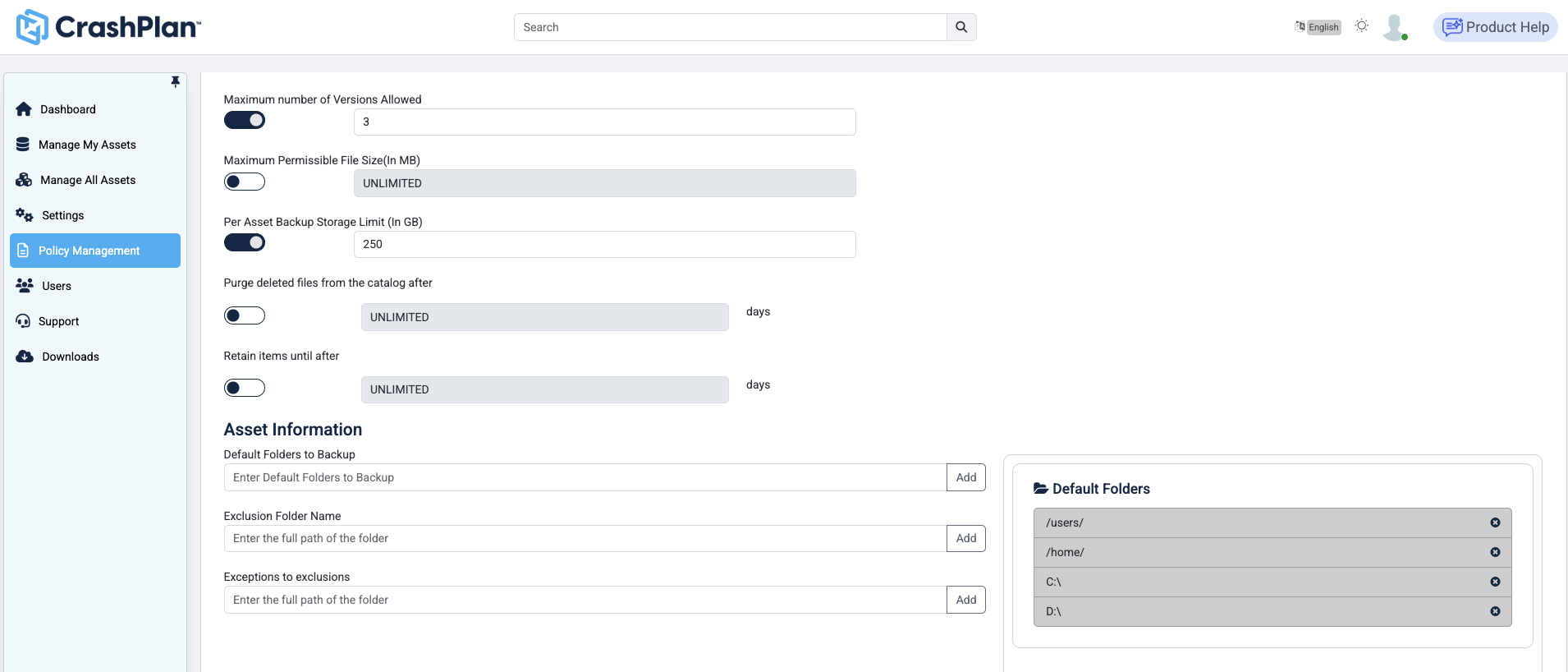
Configure maximum number of versions, file size limits, and per-asset backup storage limits, time since last active, default backup folder selections, folder exclusions and exceptions, and file extension filters to block unnecessary backups such as video files and GIFs
Data retention
Fully configurable retention limits, and you don’t pay for retention storage growth
Restore frequency
Restore as frequently as you need to, with unlimited restores included in your storage license
Restore methods
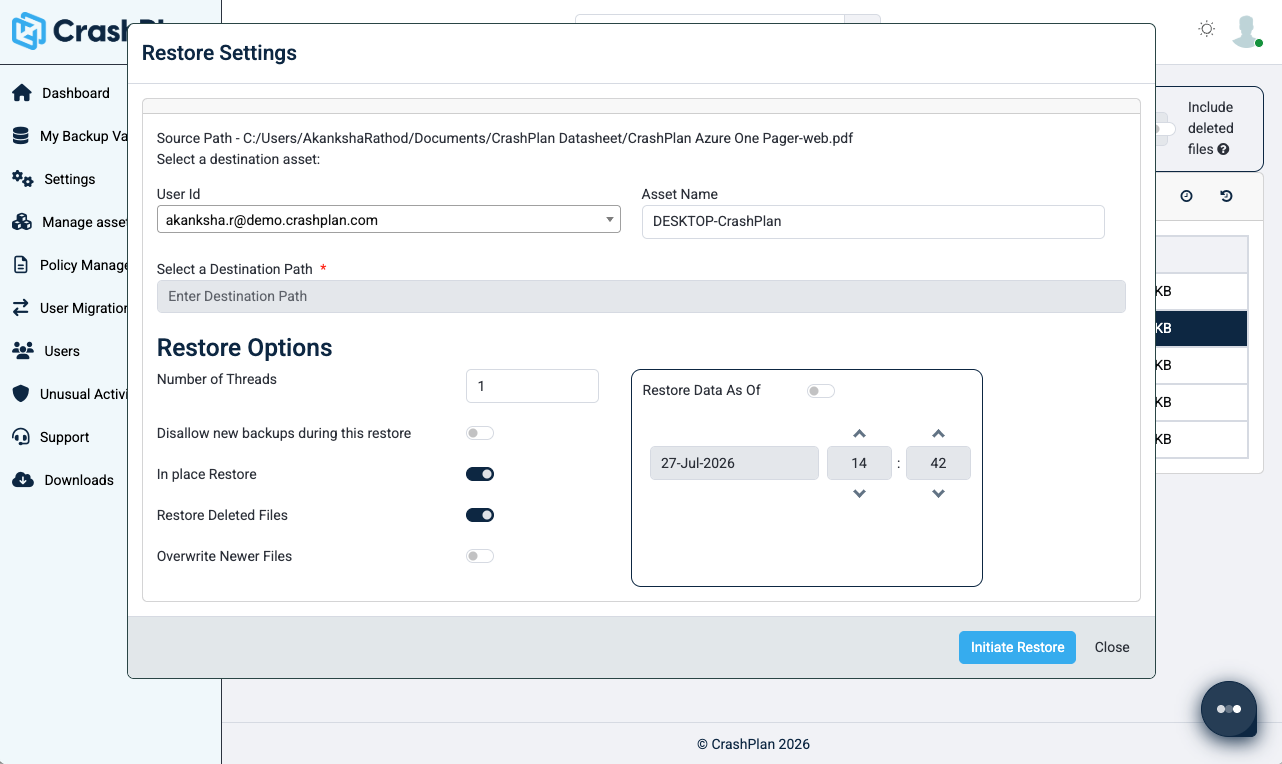
Restore to the original or an alternate location
Accelerated access
File stubbing allows selected files to become accessible before the full restore completes
CrashPlan-managed storage
Microsoft Azure or CrashPlan proprietary data centers
Customer-managed storage
Microsoft Azure, Amazon Web Services, and S3-compatible storage
Data residency
Choose the country where you want your data stored
Access control
Microsoft Entra ID integration, role-based access control, delegated administration, configurable reports, and alerts
Encryption
AES-256 encryption at rest and TLS 1.2 or later in transit
Encryption-key control
Customer-controlled encryption keys
Backup security
Immutable backup copies
Compliance and governance
Audit trails, storage-location choice, policy-based retention, defensible deletion, and legal-hold support
Capacity-based pricing
Pay for total protected source data capacity instead of licensing every server individually. Unlimited data retention and restore frequency included.
Capacity measurement
Capacity is measured on total source data backed up, not the volume of backup data in storage, so you are not paying for retention data as it grows.
Data transfer
There are no ingress or egress data transfer fees. They are included in your one flat rate.

Frequently Asked Questions

What is CrashPlan server backup and recovery for enterprises?

CrashPlan server backup is an enterprise backup and recovery solution for business data stored on servers. It automates incremental backups, applies administrator-defined policies and supports employee or administrator recovery through centralized management.

Who is CrashPlan server backup designed for?

CrashPlan server backup is designed for enterprise and institutional IT organizations managing distributed or mixed operating system environments. It gives administrators centralized control over server protection, storage, policy, visibility and recovery.

Which server operating systems does CrashPlan support?

CrashPlan supports Windows (2025, 2022, 2019, 2016) and Linux (tbc) server operating systems.

Do you have a dedicated SQL/Oracle agent.

No, CrashPlan does not have dedicated SQL/Oracle agents. Instead, CrashPlan does application-consistent database backups via a proven dump & sweep script. As a result there is no per-database agent to license, patch or maintain. A single method for both SQL and Oracle means fewer moving parts and fewer points of failure.

Where can CrashPlan store server backup data?

Customers can choose to store their server backup data in CrashPlan managed storage or customers can bring their own cloud storage including Azure, AWS or other S3-compatible destinations.

How do I choose where to store my data?

CrashPlan data centers offer a cost-efficient managed storage option. CrashPlan-managed Azure is a strong fit for organizations that prioritize Azure alignment, regional flexibility, or Microsoft cloud standards.

Do I need a separate system for server backup?

No. Server backup is part of the CrashPlan platform, so you can manage endpoints, Microsoft 365, and servers together.

What can I back up on servers?

Files, folders, registry, event logs, system state metadata and and SQL/Oracle backup. Other application-aware and database-aware backups are not supported.

How does recovery work?

You can restore files, folders and systems from a central interface or the server agent, so recovery is straightforward and quick.

Will this work in a large environment?

Yes. CrashPlan is built to support distributed environments with centralized management and consistent policies.

Does CrashPlan require a backup appliance?

No CrashPlan stores your server data in the cloud, and is a SaaS delivered solution, so no appliances are required.

Can CrashPlan protect physical servers?

Yes CrashPlan can protect physical Windows and Linux servers.

Does CrashPlan protect virtual machines?

Yes CrashPlan can protect virtual machines that have a guest OS. Hypervisor support is currently on the roadmap.

How often does CrashPlan backup server data?

CrashPlan performs automatic, incremental backups according to intervals defined by the administrator. Organizations can customize backup frequency to fit their protection requirement and server environment.

Can backup intervals, retention, and file-version policies be customized?

Yes. Administrators can configure backup intervals, file selection, versioning, version aging, retention, user quota and optional CPU or network bandwidth throttling.

How long can server backups be retained?

There is no limit to how long server backups can be retained, and it is fully configurable.

How does CrashPlan reduce server backup costs?

CrashPlan reduces server backup costs by eliminating the per server licensing fee most vendors charge. We also offer flexible storage locations, including our own proprietary data centers which significantly lower costs over most vendors which lock you into their hyperscaler storage.

How is CrashPlan Server Backup priced?

CrashPlan server backup is priced on the total volume of protected data. There is no per server license fee.

Right-Size Your Server Backup Strategy

See how CrashPlan can reduce the cost and complexity of protecting your server environment while giving your IT team reliable, enterprise-grade recovery.